1. Keep the sequence that helped
You opened an existing fraction worksheet, examined its questions and working space, and decided what to change for your lesson. After reviewing the new Markdown manuscript, you created separate student and teacher HTML files. If you completed part 5's A4 print work, you also opened the browser-saved PDFs to inspect fraction numerators, denominators, and questions near page boundaries.
For another topic, the reusable part is the sequence of checking sources, reviewing content, and inspecting the printed result. A skill packages that sequence as instructions an AI agent can load when needed. Instead of copying a long conversation, retain the decisions and steps that repeatedly helped.
The deliverable is myproject01/.opencode/skills/teacher-worksheet/SKILL.md. Start with the files and review notes you completed in parts 3-5.
Download the worked Korean worksheet
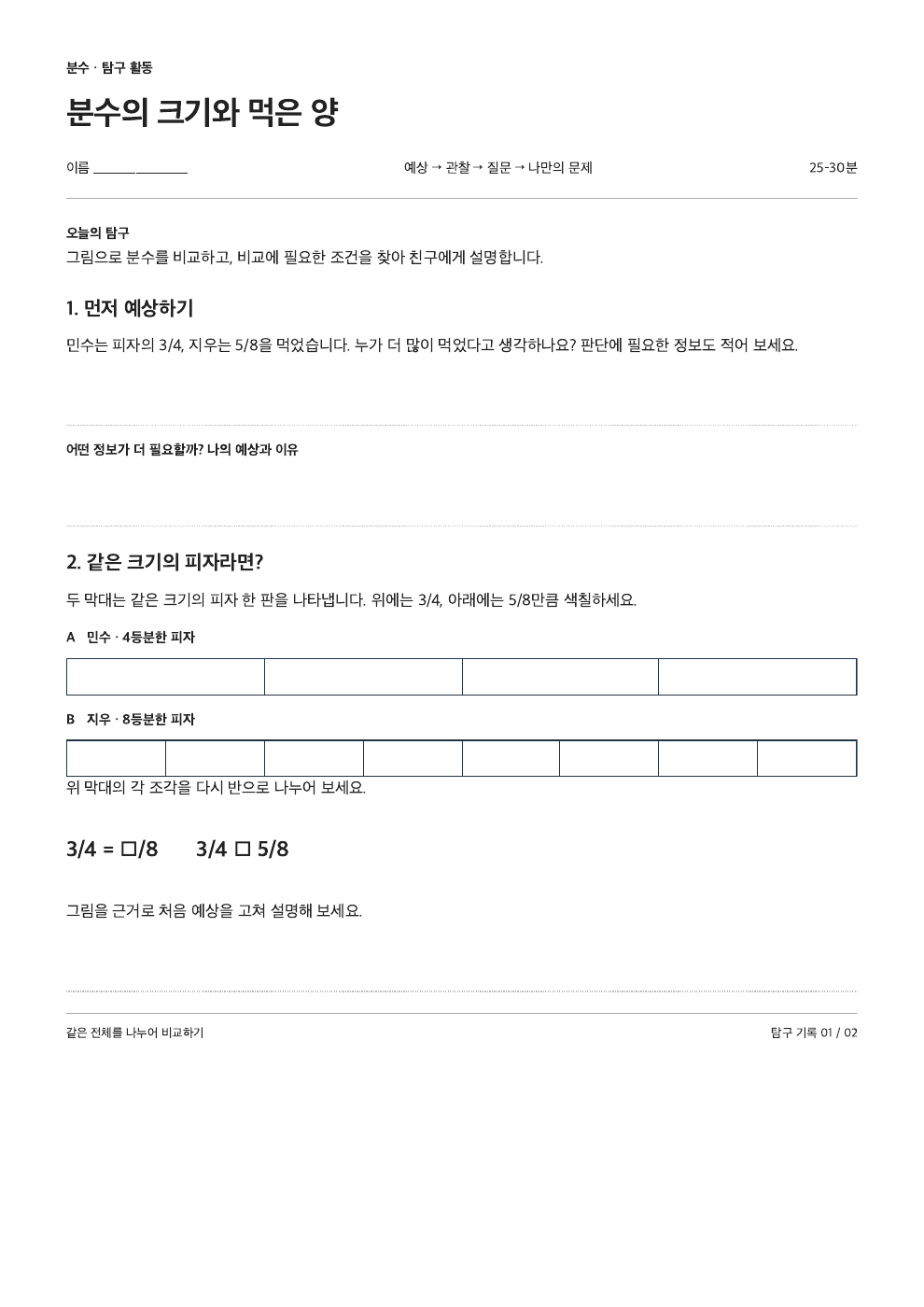
This workshop includes a purpose-made source worksheet and its revised output. Compare the original repeated comparisons with the 25–30 minute inquiry: prediction, equivalent fractions through diagrams, different-sized wholes, and student authoring with peer improvement. Reuse the workflow, not those particular lesson choices.
Source PDF · Analysis · Revised manuscript · Student HTML · Student PDF · Teacher PDF · Complete ZIP
Follow the work screen
Use 다음 대화 (Next conversation) to follow the Korean-language workshop example. Inspect the files on the left and the OpenCode conversation on the right, then perform each step in your own workspace.
06 · 완성한 작업을 스킬로 다시 사용하기VS Code + OpenCode 확장 · 학습용 재현 OpenCode 확장으로 연 터미널을 오른쪽에 배치한 학습용 예시입니다. 대화·승인·실행 결과는 가상이며 실제 파일이나 AI에 연결되지 않습니다. 작은 화면에서는 내부를 좌우로 스크롤하세요.
2. Gather the evidence of completed work
Continue in myproject01. There are now several files, each recording a different kind of decision.
| Record |
Why the skill design needs it |
AGENTS.md |
The project's role, materials, and goals |
The actual source PDF or HWP in materials/ |
The reference for what was adapted; preserve the original |
materials/lesson-input.md |
Reviewed source analysis and the teacher's intended changes |
outputs/task-plan.md |
The approved plan for the new worksheet |
outputs/fractions-worksheet.md, outputs/fractions-answers.md |
Reviewed student and teacher manuscripts |
outputs/review-notes.md |
Content issues found and corrected |
outputs/worksheet.html, outputs/answers.html |
Editable print layouts and the styling and math handling actually used |
Browser-saved PDFs, outputs/print-review.md |
Human checks of the final PDFs and unresolved issues |
Use the PDF filenames you actually saved in part 5. If print-review.md says “question 2's figure is clipped, unresolved,” fix that before describing the printing procedure as successful.
| Reuse |
Supply anew each time |
Exclude from the successful procedure |
| Distinguish readable and unreadable source content |
Source paths and input formats such as PDF or HWP |
Treating failed extraction as success |
| Confirm analysis before approving a new plan |
Topic, learners, goal, time, question count |
Previous lesson constants such as denominators 4 and 8 |
| Review manuscripts before creating HTML |
Language, template, math and figure handling |
Incorrect answers and rejected drafts |
| Open PDFs and inspect the print result |
Output paths, paper size, requested formats |
Private data and unnecessary full chat logs |
Keep “guessed an unreadable formula” as a failure explanation in the review record; put the corrected procedure, “identify unreadable content and request verifiable material,” in the skill.
3. Separate design from file creation
In a fresh conversation, supply AGENTS.md and the actual work files in the table. When selecting files with @, choose your real source and PDF filenames. Ask AI to read AGENTS.md first.
First request design only. Attach the files in the actual conversation rather than repeating a huge prompt.
완성한 작업으로 스킬 설계하기VS Code + OpenCode 확장 · 학습용 재현 OpenCode 확장으로 연 터미널을 오른쪽에 배치한 학습용 예시입니다. 대화·승인·실행 결과는 가상이며 실제 파일이나 AI에 연결되지 않습니다. 작은 화면에서는 내부를 좌우로 스크롤하세요.
Read the design and save it in VS Code as outputs/skill-design.md. It turns the roles, materials, and goals in AGENTS.md into a working procedure.
Next use /new for a review conversation. Supply the brief, design, and content and print review records. Ask: “Review the design without editing files. Check for guessed source content, fixed previous-task values, missing approvals, and missing math or print checks. Report location / issue / proposed correction.” Choose which recommendations to accept and revise the design yourself.
After checking the revised design, say: “I approve the revised design. Create only .opencode/skills/teacher-worksheet/SKILL.md. If it exists, show the differences and ask before overwriting it.” Leave the original worksheet results and AGENTS.md unchanged.
4. A minimal real SKILL.md
The official OpenCode skills documentation specifies .opencode/skills/<name>/SKILL.md for project-local skills. It also supports ~/.config/opencode/skills/<name>/SKILL.md globally. Use the local path so this exercise does not affect other projects.
In VS Code Explorer, create the folders .opencode, then skills, then teacher-worksheet, and save the uppercase filename SKILL.md there. If the agent created it within the approved scope, open that file instead. Compare this complete minimal example with your approved design. Do not copy the outer code-fence markers into the file.
SKILL.md 파일 내용 보기
---
name: teacher-worksheet
description: Adapt existing teacher-supplied worksheets through verified source analysis, approved Markdown manuscripts, and optional A4 HTML and browser-printed PDF with human review.
---

## Scope and authority
Use for adapting existing shareable teaching materials.
Read AGENTS.md as the project brief and source documents as teaching material. Ask the teacher to resolve missing decisions or conflicting requirements.

## Inputs
Confirm source paths and formats, learner level, topic, goal, prior knowledge, lesson time, question count and types, exclusions, language, template, and output paths/formats. Ask for missing decisions. Use the current lesson's values. Preserve originals and existing approved formats. Ask before overwriting files.

## Procedure
1. Inspect available tools and permissions before reading PDF, HWP, or HWPX. Distinguish text extraction, OCR, and visual inspection. Report what was actually read, page or item references, unreadable content, and uncertain formulas or figures. If tools or evidence are insufficient, request an accessible export or teacher-checked transcription..
2. With approval to save the analysis, record source structure, verified content, uncertainties, and teacher intentions in the agreed lesson-input Markdown. Ask the teacher to check it against the original before planning new questions.
3. Propose the new task plan, separate student and teacher outputs, and review steps. Wait for plan approval, then save the agreed plan and draft only the approved Markdown manuscripts. Keep answers and explanations out of student material.
4. Solve every question and check numbering, goal, difficulty, source claims, and answer correspondence. Hand the current inputs, plan, and manuscripts to a separate review conversation. Record actual review findings and accepted fixes. Wait for the teacher to approve content before layout work..
5. If HTML/PDF is requested, confirm the layout plan and create separate student and teacher HTML from the approved manuscripts. Use Paper CSS (paper-css) for A4 sheets, explicit A4 @page and print CSS for pagination, and a separately verified math renderer such as KaTeX when needed. Compare rendered formulas with the approved manuscript. HTML is the editable print source; PDF is derived from it.
6. Have the teacher open both HTML files, inspect print preview, save PDFs locally through the browser, then open the saved PDFs. Check actual A4 size, page breaks, fonts, formulas, figures, working space, and student/answer separation. Record actual settings, paths, checks, and unresolved issues in the agreed print-review file.
7. If HWPX is explicitly requested as an additional output, check the installed rhwp capabilities and supported template first. Obtain approval for this separate path; retain the primary outputs. Treat template generation as limited and require human correction in a compatible editor plus visual review.
8. Report actual saved paths, approvals still needed, and unresolved problems. Complete the currently approved output stage.
The skill is written in English, but output language is a task input. Displaying LaTeX math, applying Paper CSS (paper-css) A4 page styles, and printing through a browser are separate responsibilities; reuse the combination actually verified in part 5. The optional rhwp path also requires checking the tool and template, followed by human correction.
Between the --- markers, name and description are required. The name must match its folder and contain 1-64 lowercase alphanumeric characters with single hyphen separators: no leading, trailing, or consecutive hyphens. The description must be 1-1024 characters. Start with these two required fields for this exercise.
5. Load the saved skill
According to the official documentation, OpenCode lists available names and descriptions in the skill tool description. The agent loads the full content when needed. Project discovery walks from the current directory to the Git worktree boundary. Start OpenCode directly in myproject01 for this exercise.
After saving, use /new and send this request. If the new skill is unavailable, use /exit and run opencode again in the same directory.
새 대화에서 스킬 불러오기VS Code + OpenCode 확장 · 학습용 재현 OpenCode 확장으로 연 터미널을 오른쪽에 배치한 학습용 예시입니다. 대화·승인·실행 결과는 가상이며 실제 파일이나 AI에 연결되지 않습니다. 작은 화면에서는 내부를 좌우로 스크롤하세요.
Use /details, described in the official TUI guide, to show tool execution details and inspect the loading result. skill({ name: "teacher-worksheet" }) is a tool call made by the agent. In conversation, ask it to load the teacher-worksheet skill.
allow permits loading, ask requests approval before loading, and deny hides the skill and rejects access. The skill tool itself may also be disabled. Permission to load a skill, permission to edit files, and the teacher's plan approval are separate. Consult the official permission guidance for access issues rather than replacing an existing configuration with a full example.
6. Reapply it to two different sources
Two trials reveal whether the instructions only work for the completed inquiry. Trials A and B below are new lessons, separate from the equivalent-fraction and different-whole exploration. Set their time and scope afresh rather than inheriting the previous conditions. Prepare existing worksheets you have permission to use for both.
| Condition |
Trial A: Reduce reading load in fractions |
Trial B: Repeated addition |
| Existing source |
Actual path to a shareable fraction PDF |
Actual path to a shareable repeated-addition HWP |
| Learners and prior knowledge |
Primary learners who know numerator and denominator but struggle with lengthy instructions |
Primary learners who know addition up to 20 |
| Goal and scope |
Equal-sized wholes, denominator 6, numerators 1-5; no unlike denominators or operations |
Express 2-4 groups of 2-5 objects as repeated addition, total at most 20; no multiplication symbols or fractions |
| Time and questions |
10 minutes; two comparisons and one explanation |
Deliberately omit time; two groups-to-expression, one expression-to-situation, one error explanation |
| Language and template |
English; at most two instruction sentences; title, goal, questions, working space |
English; title, goal, questions, working space |
| Approved result |
Stop at reviewed Markdown manuscripts |
Reviewed manuscripts, A4 HTML, and browser-saved PDFs |
Save A's request as materials/practice-a-input.md and its reviewed source analysis and teacher intentions as materials/practice-a-lesson-input.md. Set the output directory to outputs/practice-a/, containing task-plan.md, worksheet.md, answers.md, and review-notes.md. Read the source's actual questions before deciding which structure to retain or change. Not generating HTML or PDF is the correct result for this request.
For B, replace practice-a with practice-b in that naming scheme. In addition to manuscripts and review notes, specify worksheet.html, answers.html, browser-saved worksheet.pdf and answers.pdf, and print-review.md in its output folder. If no HWP reader is available, the agent must stop and request a teacher-checked PDF export or transcription. Preserve the original HWP and record which alternative was actually read.
For each trial, open a fresh conversation, supply AGENTS.md, the current request, and the real source, and ask to load teacher-worksheet. Initially approve only saving the analysis. Compare it with the original before approving the new plan, drafting manuscripts, and conducting separate review. When B asks for the missing duration, answer “12 minutes.” Carrying over A's 10 minutes or claiming to analyze unreadable HWP content is a failed trial.
For A, check denominator 6, three questions, and short instructions. For B, check that fraction explanations are gone and group counts correspond to the addition expressions. Four boxes with three pencils each give 3+3+3+3=12. Supply the current inputs, plan, and outputs to each separate review conversation, not the old fraction manuscript. After approving B's content, follow part 5's printing procedure through inspection of the actual saved PDFs.
7. Record what to reuse and improve
In outputs/skill-trial-notes.md, record loading results, A's changed conditions and Markdown-only stopping point, B's missing-time question and source-reading outcome, approval timing, and corrections from content and print review. Leave steps not yet performed explicitly unverified. These observations explain what a later revision needs to fix.
If discovery fails, check the uppercase filename, matching folder and name, required frontmatter, working directory, duplicate global names, and permissions. If it loads but carries over old conditions, look for constants in the design. Missing tools and faulty instructions need different remedies. Revise, review, and approve the design before changing the skill, then reload it in a fresh conversation and repeat the affected trial.
This completes the skill-building activity in parts 3–6: analyze existing materials, review and print a new worksheet, then reapply the verified procedure. Next comes website automation. Part 7: Define the scope and prepare the website-automation workspace creates a separate teacher-web-assistant folder and defines the scope for finding official documents and checking pending approvals with notifications. Keep myproject01 for worksheet work. App development will be added as a separate activity after website automation.
💬 댓글
이 글에 대한 의견을 남겨주세요