In Part 4, you reviewed outputs/fractions-worksheet.md for students and outputs/fractions-answers.md for the teacher. Now decide on writing space and page breaks. Keep questions with their answer areas and turn the reviewed text into a classroom handout.
HTML describes a document's structure: headings, paragraphs, and question areas. You can open it in a browser and adjust its appearance with CSS rules for fonts and spacing. The AI writes the files; you judge the reading size and working space in the browser. You do not need to publish a website or run a server for this exercise.
The main layout deliverable is editable HTML. The PDF is a distribution copy printed from the checked HTML. Keep the Markdown manuscripts as the content reference too. If something is clipped in the PDF, fix the HTML and save a new PDF.
Carry Part 4's approved prediction → diagram exploration → changing conditions → authoring and improvement → reflection onto the page. The code is the actual workshop worksheet. In your own project, preserve the approved content and the diagrams' size relationships.
Download the worked Korean worksheet
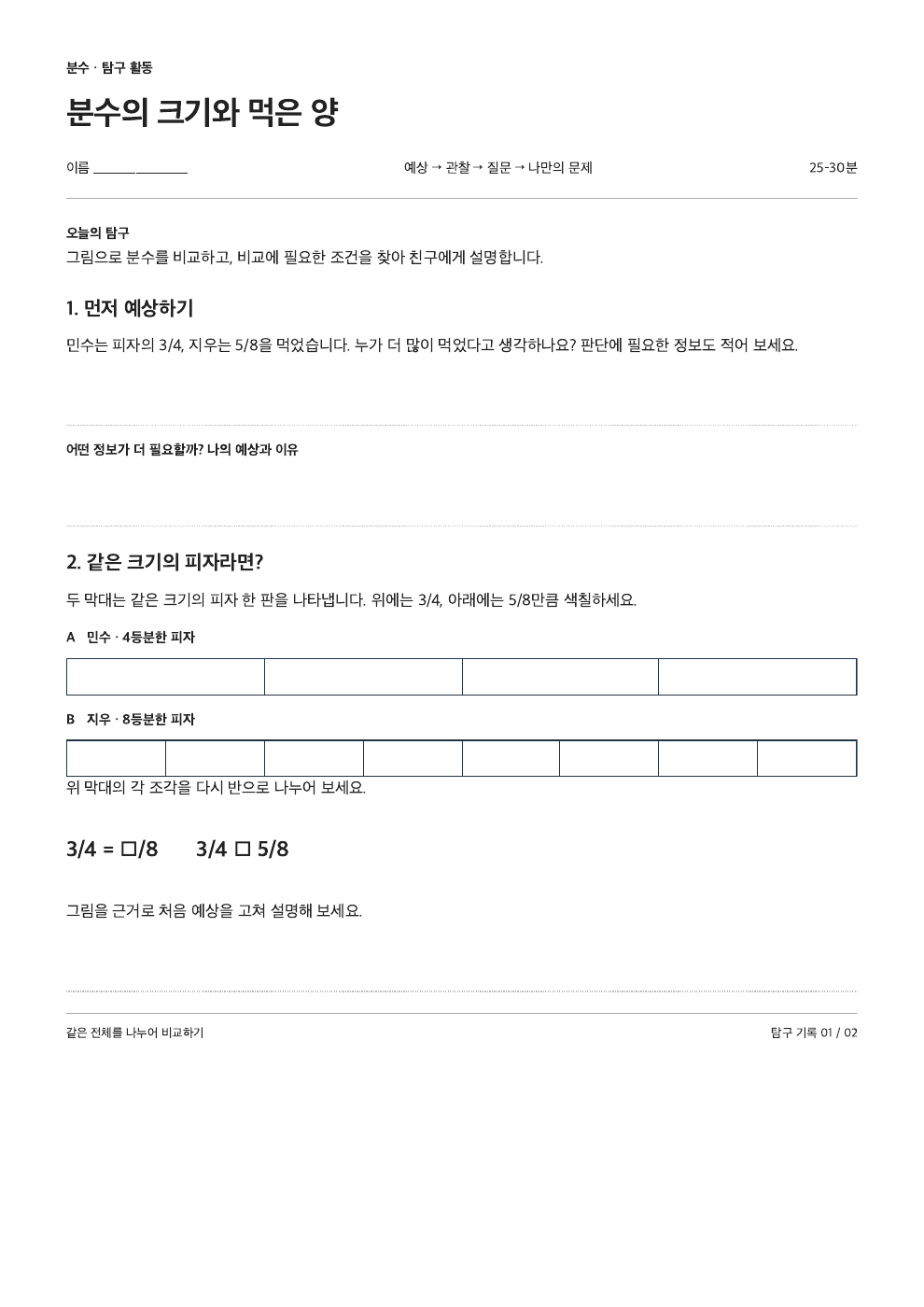
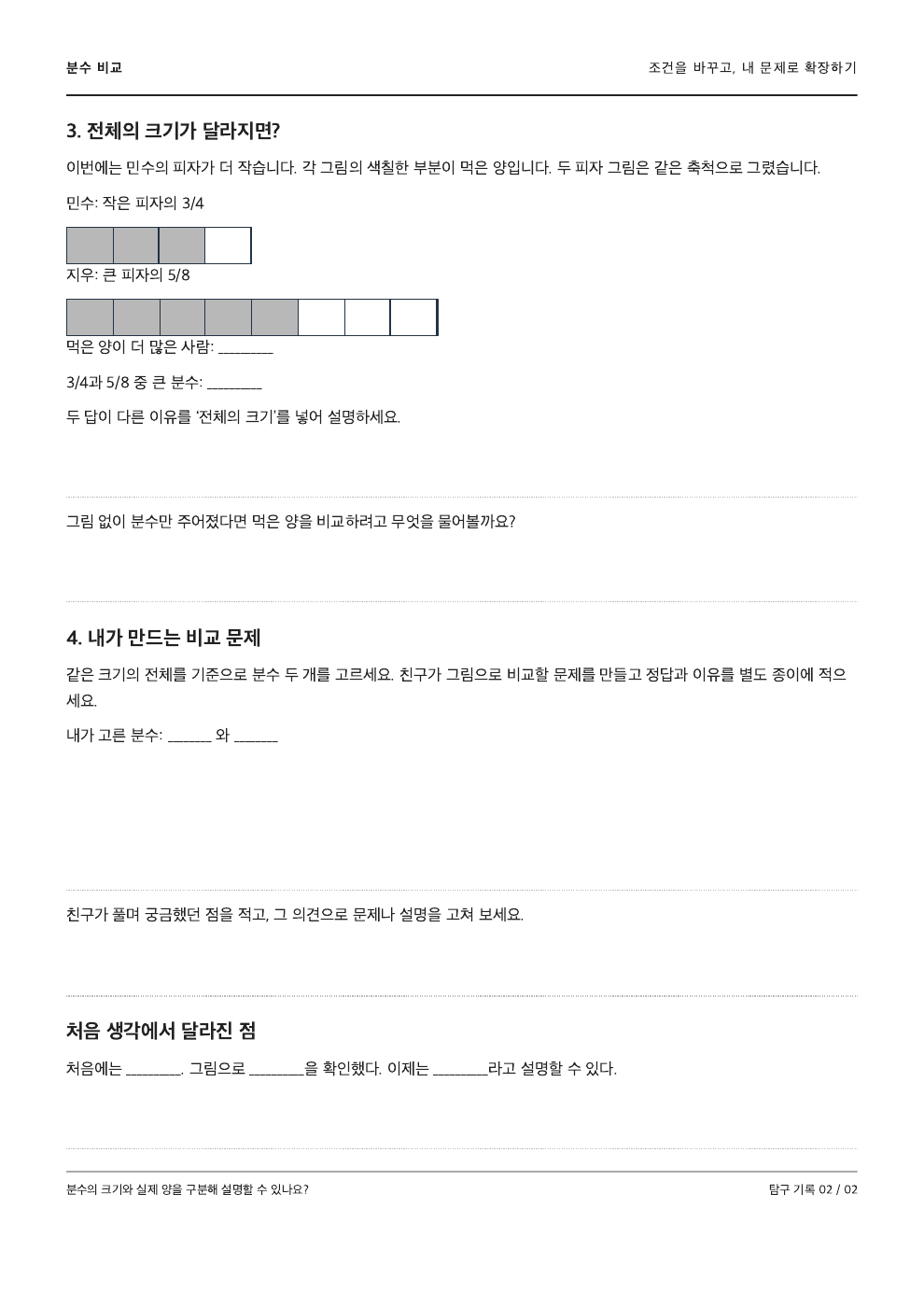
The revised Korean worksheet is a 25–30 minute inquiry for learners who already know same-denominator comparison. Page 1 moves from a prediction about (\frac{3}{4}) and (\frac{5}{8}) to equivalent fractions using equal-length bars. Page 2 changes the whole sizes, then invites students to author, peer-review, and improve a problem before reflecting.
Use 다음 대화 (Next conversation) to follow the Korean-language workshop example. Inspect the files on the left and the OpenCode conversation on the right, then perform each step in your own workspace.
05 · 나눔고딕 준비부터 PDF 확인까지VS Code + OpenCode 확장 · 학습용 재현
파일 편집 보기 터미널myproject01 — Visual Studio Code− □ ×
outputs/worksheet.html ×
myproject01 › outputs/worksheet.html
1<!-- 나눔고딕을 함께 보관한 활동지 -->
2<style>
3 @font-face {
4 font-family: "Nanum Gothic";
5 src: url("assets/fonts/NanumGothic.ttf");
6 font-weight: 400;
7 }
8 body { font-family: "Nanum Gothic"; }
9 @page { size: A4; margin: 15mm; }
10</style>
참고 문서 예시 · 실제 파일 내용은 프로젝트마다 다릅니다.
TERMINAL · OpenCode+ ··· ×
opencode05 · 나눔고딕 준비부터 PDF 확인까지Build
▌
Build · 모델 선택은 실제 환경에 따라 다름tab agents
myproject01 UTF-8 Markdown OpenCode
1 / 10
OpenCode 확장으로 연 터미널을 오른쪽에 배치한 학습용 예시입니다. 대화·승인·실행 결과는 가상이며 실제 파일이나 AI에 연결되지 않습니다. 작은 화면에서는 내부를 좌우로 스크롤하세요.
2. Separate Page Styling, Printing, and Mathematics
Paper CSS supplies a paper-like area in the browser. This chapter uses the print-oriented cognitom/paper-css project, whose package name is paper-css. It is different from the similarly named PaperCSS, the hand-drawn styling framework packaged as papercss. Choose the printing library for this A4 task.
We link version 0.3.0 from the CDN shown in its official instructions. A CDN is an internet location serving shared files; you do not need to install a package for this exercise. The library's fixed page height and hidden overflow can clip a long manuscript, so our example overrides those defaults to let content continue onto another page. Separating the following jobs makes revisions easier to request.
Job
Method in this chapter
What the teacher checks
Paper-like screen appearance
Paper CSS sheet and screen shadow
Is the manuscript comfortable to inspect?
A4 size and print margins
Explicit @page and @media print rules
Do the content and writing areas fit?
Fraction display
KaTeX and its auto-render extension
Do fraction bars, denominators, and comparison signs match the manuscript?
Connect a mathematics renderer to display LaTeX notation such as \frac{3}{4} as a fraction. Following the KaTeX browser instructions, we link its stylesheet, main script, and auto-render script. The example renders mathematics enclosed in \(...\). Compare the displayed expressions against the manuscript.
Use Naver's free Nanum Gothic font for this workshop: Regular for body text and Bold for headings. KaTeX handles mathematics. Ask the agent to prepare the fonts:
나눔고딕을 준비하고 글씨 확인하기VS Code + OpenCode 확장 · 학습용 재현
파일 편집 보기 터미널myproject01 — Visual Studio Code− □ ×
outputs/assets/fonts/ ×
myproject01 › outputs/assets/fonts/
1NanumGothic.ttf
2NanumGothicBold.ttf
3LICENSE.txt
참고 문서 예시 · 실제 파일 내용은 프로젝트마다 다릅니다.
TERMINAL · OpenCode+ ··· ×
opencode나눔고딕을 준비하고 글씨 확인하기Build
▌
Build · 모델 선택은 실제 환경에 따라 다름tab agents
myproject01 UTF-8 Markdown OpenCode
1 / 5
OpenCode 확장으로 연 터미널을 오른쪽에 배치한 학습용 예시입니다. 대화·승인·실행 결과는 가상이며 실제 파일이나 AI에 연결되지 않습니다. 작은 화면에서는 내부를 좌우로 스크롤하세요.
Check the two font files and license in the prepared folder. After installation, choose Nanum Gothic in Hangul or Word and type a short sentence. HTML uses the bundled font files; transfer the assets folder together with the HTML to another computer.
3. Ask the AI to Create Two HTML Files
Open OpenCode in myproject01 and send the following request. If outputs/review-notes.md still contains unresolved content issues, return to Part 4 first. Define the scope so layout work does not quietly change the mathematics.
OpenCode 확장으로 연 터미널을 오른쪽에 배치한 학습용 예시입니다. 대화·승인·실행 결과는 가상이며 실제 파일이나 AI에 연결되지 않습니다. 작은 화면에서는 내부를 좌우로 스크롤하세요.
Separate files reduce distribution mistakes. Do not put solutions in the student HTML and merely hide them on screen. The teacher file uses the same font and margin rules but contains the approved solutions and teaching notes instead of student writing areas.
4. A Complete Example You Can Open
This is the Korean student worksheet used in the workshop, not a separate English exercise. Its two pages follow the inquiry described in Part 4. Preview the finished worksheet first; expand the source only if you want to inspect it. To try changes, keep the HTML and bundled assets together in a separate practice folder.
Scroll inside the preview to see the whole worksheet. The source code is below.
View HTML source
<!doctype html><html lang="ko"><head> <meta charset="utf-8"> <meta name="viewport" content="width=device-width, initial-scale=1"> <title>분수 비교 탐구 - 학생용</title> <link rel="stylesheet" href="https://cdnjs.cloudflare.com/ajax/libs/paper-css/0.3.0/paper.css"> <link rel="stylesheet" href="https://cdn.jsdelivr.net/npm/[email protected]/dist/katex.min.css"> <script defer src="https://cdn.jsdelivr.net/npm/[email protected]/dist/katex.min.js"></script> <script defer src="https://cdn.jsdelivr.net/npm/[email protected]/dist/contrib/auto-render.min.js" onload="renderMathInElement(document.body, {throwOnError: true});"></script> <style>@font-face{font-family:Nanum;src:url("assets/fonts/NanumGothic.ttf")}@font-face{font-family:Nanum;src:url("assets/fonts/NanumGothicBold.ttf");font-weight:700}:root{--ink:#222;--accent:#222;--rule:#aaa;--paper:white;--warm:#222}*{box-sizing:border-box}body{margin:0;padding:28px 12px;background:#ededeb;color:var(--ink);font:10.5pt/1.6 Nanum,sans-serif}body.A4 .sheet{width:100%;max-width:210mm;height:auto;overflow:visible;margin:0 auto 24px;padding:15mm;background:white;box-shadow:none;page-break-after:auto}h1,h2,p{margin:0}h1{font:700 21pt/1.3 Nanum,sans-serif;letter-spacing:-.5px;margin:3mm 0 5mm;max-width:155mm}h2{font:700 13pt/1.5 Nanum,sans-serif;margin:0 0 2mm}p{margin-bottom:2mm}h2::first-letter{color:var(--accent)}.eyebrow{font-size:9pt;font-weight:700;letter-spacing:0;color:var(--accent);padding-top:0}.meta{display:flex;justify-content:space-between;font-size:9pt;padding-bottom:4mm;border-bottom:1px solid var(--rule)}.intro{margin:5mm 0;padding:0;border:0;background:white}.intro b{font-size:9pt;color:var(--accent)}.intro p{margin:0}.question{margin:5mm 0;break-inside:avoid}.work{min-height:13mm;margin:1mm 0 3mm;border:0;border-bottom:1px dotted #bbb;border-radius:0;background:white}.bar-label{font-size:9pt;font-weight:700;margin-top:3mm}.equation{margin:4mm 0;padding:3mm 0;border:0;text-align:left;font-size:14pt;font-weight:700}.page-label{display:flex;justify-content:space-between;border-bottom:2px solid var(--ink);padding-bottom:3mm;margin-bottom:5mm;font-size:9pt;letter-spacing:1px}.footer{display:flex;justify-content:space-between;border-top:1px solid var(--rule);padding-top:2mm;margin-top:5mm;color:var(--accent);font-size:8pt}.choices{padding:3mm 4mm;background:var(--paper);margin:3mm 0}.reflect{border:0;padding-left:0}.new-page>h2{margin-top:4mm}*{print-color-adjust:exact;-webkit-print-color-adjust:exact}@page{size:A4;margin:15mm}@media print{body.A4{width:auto;padding:0;background:white}body.A4 .sheet{width:auto;max-width:none;margin:0;padding:0;box-shadow:none;border:0}.new-page{break-before:page}}@media(max-width:600px){body{padding:8px}body.A4 .sheet{padding:20px}h1{font-size:23px;letter-spacing:-.5px}.meta{flex-wrap:wrap;gap:8px}.work{min-height:60px}} </style></head><body class="A4"> <main class="sheet"><div class="eyebrow">분수 · 탐구 활동</div><h1>분수의 크기와 먹은 양</h1><div class="meta"><span>이름 ____________________</span><span>예상 → 관찰 → 질문 → 나만의 문제</span><span>25–30분</span></div><section class="intro"><b>오늘의 탐구</b><p>그림으로 분수를 비교하고, 비교에 필요한 조건을 찾아 친구에게 설명합니다.</p></section><section class="question"><h2>1. 먼저 예상하기</h2><p>민수는 피자의 \(\frac{3}{4}\), 지우는 \(\frac{5}{8}\)을 먹었습니다. 누가 더 많이 먹었다고 생각하나요? 판단에 필요한 정보도 적어 보세요.</p><div class="work"></div><p class="bar-label">어떤 정보가 더 필요할까? 나의 예상과 이유</p><div class="work"></div></section><section class="question"><h2>2. 같은 크기의 피자라면?</h2><p>두 막대는 같은 크기의 피자 한 판을 나타냅니다. 위에는 \(\frac{3}{4}\), 아래에는 \(\frac{5}{8}\)만큼 색칠하세요.</p><p class="bar-label">A 민수 · 4등분한 피자</p><div style="display:flex;width:100%;height:32px;border:1px solid #234"><span style="flex:1;border-right:1px solid #234;background:white"></span><span style="flex:1;border-right:1px solid #234;background:white"></span><span style="flex:1;border-right:1px solid #234;background:white"></span><span style="flex:1;border-right:1px solid #234;background:white"></span></div><p class="bar-label">B 지우 · 8등분한 피자</p><div style="display:flex;width:100%;height:32px;border:1px solid #234"><span style="flex:1;border-right:1px solid #234;background:white"></span><span style="flex:1;border-right:1px solid #234;background:white"></span><span style="flex:1;border-right:1px solid #234;background:white"></span><span style="flex:1;border-right:1px solid #234;background:white"></span><span style="flex:1;border-right:1px solid #234;background:white"></span><span style="flex:1;border-right:1px solid #234;background:white"></span><span style="flex:1;border-right:1px solid #234;background:white"></span><span style="flex:1;border-right:1px solid #234;background:white"></span></div><p>위 막대의 각 조각을 다시 반으로 나누어 보세요.</p><p class="equation">\(\frac{3}{4}\) = \(\frac{\square}{8}\) \(\frac{3}{4}\) □ \(\frac{5}{8}\)</p><p>그림을 근거로 처음 예상을 고쳐 설명해 보세요.</p><div class="work"></div></section><footer class="footer"><span>같은 전체를 나누어 비교하기</span><span>탐구 기록 01 / 02</span></footer></main><main class="sheet new-page"><div class="page-label"><b>분수 비교</b><span>조건을 바꾸고, 내 문제로 확장하기</span></div><h2>3. 전체의 크기가 달라지면?</h2><p>이번에는 민수의 피자가 더 작습니다. 각 그림의 색칠한 부분이 먹은 양입니다. 두 피자 그림은 같은 축척으로 그렸습니다.</p><div style="max-width:160px"><p>민수: 작은 피자의 \(\frac{3}{4}\)</p><div style="display:flex;width:100%;height:32px;border:1px solid #234"><span style="flex:1;border-right:1px solid #234;print-color-adjust:exact;-webkit-print-color-adjust:exact;background:#b8b8b8"></span><span style="flex:1;border-right:1px solid #234;print-color-adjust:exact;-webkit-print-color-adjust:exact;background:#b8b8b8"></span><span style="flex:1;border-right:1px solid #234;print-color-adjust:exact;-webkit-print-color-adjust:exact;background:#b8b8b8"></span><span style="flex:1;border-right:1px solid #234;background:white"></span></div></div><div style="max-width:320px"><p>지우: 큰 피자의 \(\frac{5}{8}\)</p><div style="display:flex;width:100%;height:32px;border:1px solid #234"><span style="flex:1;border-right:1px solid #234;print-color-adjust:exact;-webkit-print-color-adjust:exact;background:#b8b8b8"></span><span style="flex:1;border-right:1px solid #234;print-color-adjust:exact;-webkit-print-color-adjust:exact;background:#b8b8b8"></span><span style="flex:1;border-right:1px solid #234;print-color-adjust:exact;-webkit-print-color-adjust:exact;background:#b8b8b8"></span><span style="flex:1;border-right:1px solid #234;print-color-adjust:exact;-webkit-print-color-adjust:exact;background:#b8b8b8"></span><span style="flex:1;border-right:1px solid #234;print-color-adjust:exact;-webkit-print-color-adjust:exact;background:#b8b8b8"></span><span style="flex:1;border-right:1px solid #234;background:white"></span><span style="flex:1;border-right:1px solid #234;background:white"></span><span style="flex:1;border-right:1px solid #234;background:white"></span></div></div><p>먹은 양이 더 많은 사람: __________</p><p>\(\frac{3}{4}\)과 \(\frac{5}{8}\) 중 큰 분수: __________</p><p>두 답이 다른 이유를 ‘전체의 크기’를 넣어 설명하세요.</p><div class="work"></div><p>그림 없이 분수만 주어졌다면 먹은 양을 비교하려고 무엇을 물어볼까요?</p><div class="work"></div><section class="question"><h2>4. 내가 만드는 비교 문제</h2><p>같은 크기의 전체를 기준으로 분수 두 개를 고르세요. 친구가 그림으로 비교할 문제를 만들고 정답과 이유를 별도 종이에 적으세요.</p><p>내가 고른 분수: ________ 와 ________</p><div class="work" style="min-height:30mm"></div><p>친구가 풀며 궁금했던 점을 적고, 그 의견으로 문제나 설명을 고쳐 보세요.</p><div class="work"></div></section><section class="question"><h2 class="reflect">처음 생각에서 달라진 점</h2><p>처음에는 __________. 그림으로 __________을 확인했다. 이제는 __________라고 설명할 수 있다.</p><div class="work"></div></section><footer class="footer"><span>분수의 크기와 실제 양을 구분해 설명할 수 있나요?</span><span>탐구 기록 02 / 02</span></footer></main></body></html>
@page sets A4 paper with a 15mm margin on every side, leaving a content area 180mm wide and 267mm high. The white screen sheet has internal padding; print rules remove that padding from .sheet so it does not double the paper margins. See MDN's @page explanation for the rule's purpose.
Paper CSS normally fixes an A4 sheet at 296mm high and hides overflowing content. Our body.A4 .sheet rule changes its height to auto, makes overflow visible, and removes the forced break after the sheet. For printing, it also replaces the library's fixed 210mm body width so the content fits inside the margins. Additional questions can flow onto another page; choose the break position in print preview.
The .question rule asks the browser to keep a question with its writing area. If that whole section is taller than one printable page, the browser cannot honor the request; split the content. The AI can add the new-page class to a section that must start on a fresh printed page. The screen sheet is only an approximation; use print preview to confirm the actual break. Forcing a page break after the final section can create an unwanted blank page.
This example downloads Paper CSS, KaTeX, and mathematical fonts. If the school network blocks a CDN and leaves \frac visible, use the offline setup below to display the mathematics before printing.
For offline use, ask the AI to place the Paper CSS and KaTeX distribution files under outputs/assets/ and change the HTML to relative asset paths. Keep KaTeX's CSS and scripts, contrib/auto-render.min.js, the fonts/ folder beside the CSS, and license files together. Distribute the HTML with its assets folder and reopen it with the network disconnected.
5. Revise Between the Browser and Print Preview
Open the file and follow the prediction, same-whole and different-whole diagrams, student-authoring space, and final reflection. Narrow the window to check comfortable reading at phone width. Then open print preview to inspect the A4 page breaks.
Check the student and teacher files independently:
Wait for mathematics and fonts to finish displaying. Compare numerators, denominators, comparison signs, question numbers, and wording against the manuscripts.
Open printing with Ctrl+P on Windows or Command+P on macOS. Start with A4, portrait, and 100% scale; turn headers and footers off. If your browser's default margins override the CSS, set custom margins to 15mm on every side. Do not add another margin inside the content.
Look through every page for separated activities and writing areas, clipped denominators or right edges, and unwanted blank pages. Shaded regions must remain distinguishable in grayscale. In particular, check that Activity 3's shading and two-to-one whole sizes survive in the PDF.
Close printing and tell the AI where the problem appears and what should change. After it edits the file, refresh the browser and repeat the preview with the same settings.
When you find clipping, connect the location to a concrete revision request, as in these examples.
What the preview shows
What to request
What to look for next
Question 4 is on page 1, its writing area on page 2
Group them and move the whole group to the next page
Students can see the question while writing
A long expression is clipped at the right edge
Split the expression at meaningful points; remove print clipping and scrolling
The final term and comparison sign are visible
Only the final partner area becomes too small
Preserve approved writing space; adjust earlier spacing or page breaks
Enough room to write an explanation
Solutions follow the student questions
Remove solutions from the student file; keep them only in the teacher file
No practice answers anywhere in the student document
For example: "Question 4's writing area moves onto the next page. Keep the 11pt body and writing-area height; start question 4 on the next page." If fitting the layout requires changing a question or explanation, revise the Markdown manuscript first, review its content again, and then update both HTML files.
6. Save PDFs and Record What You Actually Checked
When the layout is ready, use Save as PDF in the print dialog or the operating system's PDF-saving option. Save separate files as outputs/worksheet.pdf and outputs/answers.pdf. Reopen them to inspect page counts, mathematics, and writing areas. Check the first heading and last page to ensure you did not save the teacher version under the student filename. If you will distribute paper copies, print one trial copy to judge the text size and writing space. Browsers and printers can produce different results.
Record the findings in outputs/print-review.md: browser used; A4, 15mm, and 100% settings; actual page counts for each PDF; page-break revisions; and checks of mathematics and answer separation. You can describe your preview observations to the AI and have it record them. Include whether you made a physical trial print so you can refer to that detail next time.
If your school requires HWPX, add it as a separate deliverable. Preserve the source, fill an approved template, and open the result in Hangul for a person to correct tables, equations, and page breaks. This exercise finishes with HTML and a PDF saved from its checked print layout.
You have now connected source analysis, manuscript review, HTML layout, and print inspection. In Part 6, collect the requests and checks that actually worked into a skill you can reuse with the next teaching resource.
💬 댓글
이 글에 대한 의견을 남겨주세요